Tenant communication software that reaches the right people, in real time.
Communications is the tenant communication software in Properlex, built for commercial, retail, mixed-use and industrial property in New Zealand and Australia. Write a notice once and send it by SMS, email and InMail to the properties, contact types and positions you choose. It goes the moment you press send, replies come back into a shared inbox filed against the property, and delivery is recorded for every recipient.
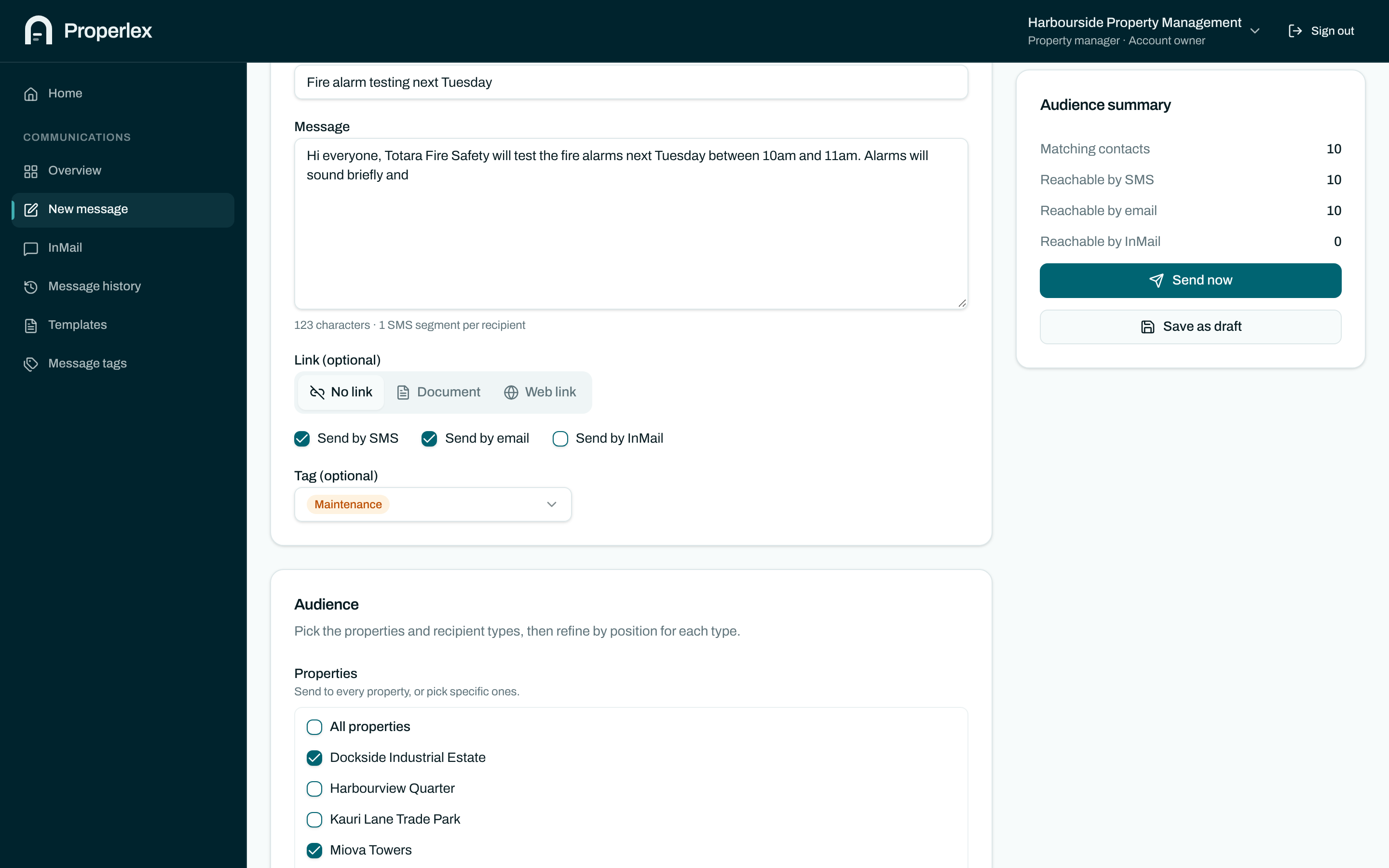
- Choose the peoplePick the properties, then the contact types and positions to include.
- Pick the channelsSMS, email and InMail, together or on their own.
- Check the reachSee how many people each channel reaches before anything is sent.
- Send, or save a draftIt goes the moment you press send, from the property, in your brand.
What is tenant communication software?
Tenant communication software lets a property manager reach the people at their properties from one place, instead of from email lists, spreadsheets and phone trees. You choose the properties and the people, write the notice once, and send it on the channels they will actually see.
In Properlex that means SMS, email and InMail from one composer. Before you send, you see how many people each channel reaches. The message goes the moment you press send, replies come back into a shared inbox filed against the property, and every recipient's delivery status is recorded as the SMS carrier and mail server report back, on a delivery report you can show an owner or an insurer.
The contacts stay right because each tenant, vendor and partner company keeps its own people current in its free portal. For urgent notices, see emergency notification software for property management.
Write once, reach everyone who needs to know
Broadcasts go to exactly the people they are for, on the channels they will see.
- Choose properties, contact types, positions and tenant types, and see how many people each channel reaches before you send.
- Send SMS, email and InMail together, from saved templates and drafts, and tag each message so it files itself.
- Add a tracked link or a property document to a message.
- Each property sends email from its own Properlex address, in your brand.
Emergency notices that reach who is actually there
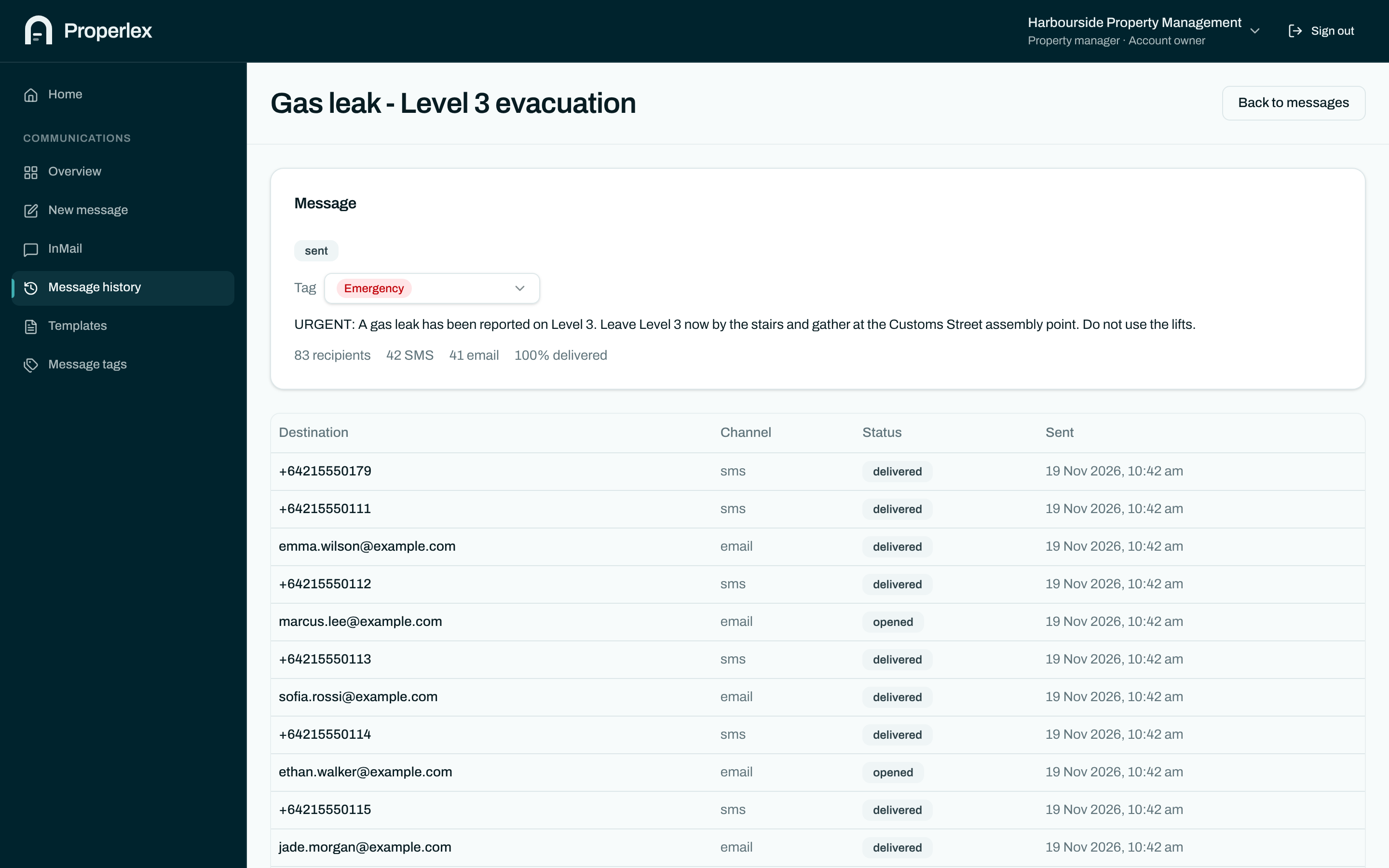
When something goes wrong, the emergency composer is one tap from the home screen.
- Emergency mode starts with SMS and email, your Emergency tag and the tenants who hold your Emergency position.
- With Visitor Management on, visitors signed in on site are added too.
- Delivered or bounced, recorded for every recipient, so you know who to reach another way.
Conversations that stay with the business
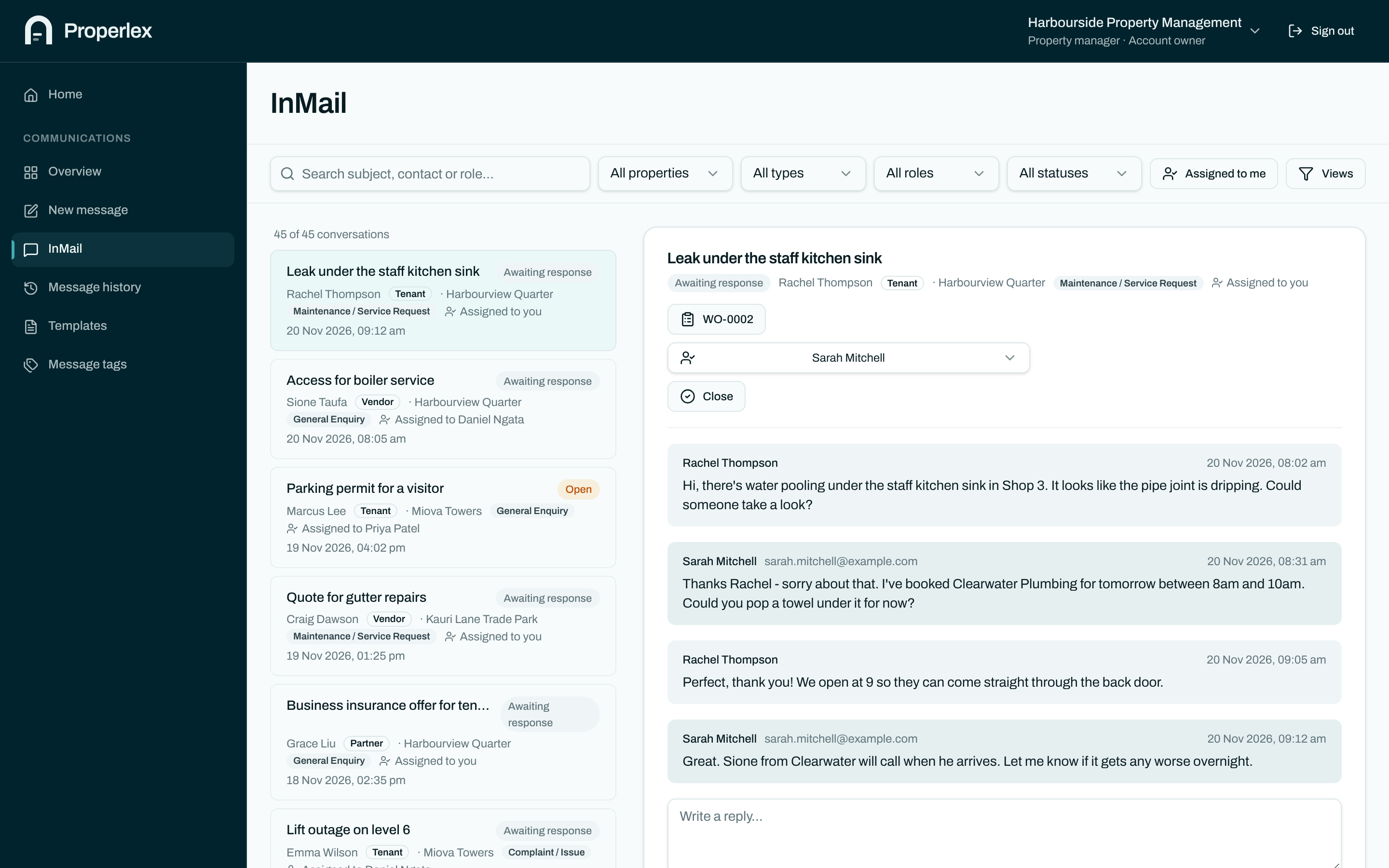
InMail is two-way messaging inside each party's portal.
- Tenants, vendors and partners message you from their portal, with photos.
- Conversations go to the right person by property and enquiry type, and can be reassigned.
- Replies to an SMS come back as a thread you can answer by SMS.
- A tenant's maintenance request becomes a work order in one click.
Proof of delivery, and contacts that stay current
A record you can show an owner or insurer, built on contact details the right people keep up to date.
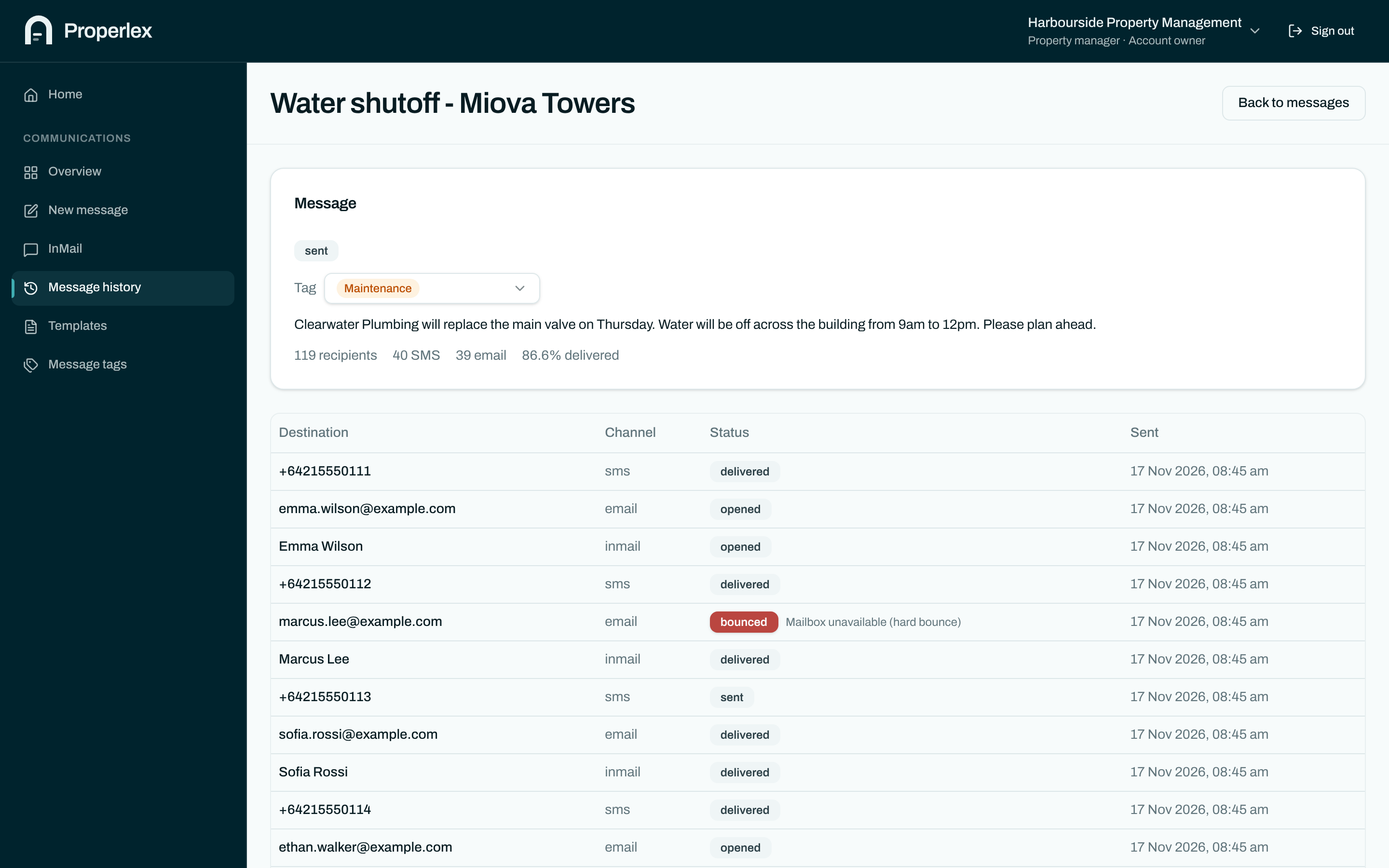
- Sent, delivered, opened, clicked and bounced, for every recipient on every channel.
- Each company you invite keeps its own people current in its portal.
- Scheduled confirm-your-details checks by SMS or email catch what has changed.
- After-hours and security numbers and property documents, published to the parties you choose.
A planned water shutdown, from notice to record
An everyday example: the water to an office building has to be turned off on Thursday morning for a valve replacement.
- 1
Choose who needs to know
MondayPick the building, then its tenants and the cleaning contractor. The composer shows how many people each channel reaches before you send.
- 2
Write it once, from a template
MondayStart from your planned outage template, add the times, attach the floor plan from the property's documents, and choose SMS and email together.
- 3
It goes the moment you press send
Straight awayEach person gets a text and an email from the property, in your brand. Nobody is copied on anyone else's details.
- 4
Delivery recorded for every recipient
As it landsAs the carrier and mail servers report back, each person shows as delivered or bounced. Two emails have bounced, so you call those tenants instead.
- 5
Replies come back to one inbox
That afternoonA tenant replies to the text asking whether the kitchen taps are affected. The reply lands in the shared inbox against the building, with the person who looks after it, and they answer it by SMS.
- 6
The record is there when someone asks
AfterwardsWeeks later a tenant says they were never told. The delivery report shows when the notice reached them, and on which channel.
Where the manual way breaks down
Most teams start with a spreadsheet of contacts, an email distribution list and a phone tree. It works until the details go stale or someone asks for proof.
| The job | Spreadsheets, email lists and phone trees | With Properlex |
|---|---|---|
| Choosing who to tell | Filter a spreadsheet by building and hope it is up to date. | Pick properties, contact types and positions, and see the reach on each channel before you send. |
| Keeping details current | Someone on your team chases changes by phone and email. | Each company keeps its own people current in its portal, and confirm-your-details checks go out on your schedule. |
| Sending on more than one channel | An email from Outlook, then texts from a phone or a separate SMS tool. | SMS, email and InMail from one composer, in one send. |
| Knowing it arrived | No way to tell who never got it. | Delivered or bounced, recorded for every recipient. |
| Handling replies | Replies scattered across personal inboxes and mobiles. | One shared inbox, filed against the property, routed to the right person. |
| Proving it later | Search sent items and hope nobody has left the business. | A delivery report and audit trail for every message. |
Who sends, who receives, who replies
- Property managers
- Send broadcasts and emergency notices, answer InMail and see delivery for every recipient.
- Tenants
- Read notices and reply in their portal, and raise maintenance requests.
- Vendors
- Receive site notices and documents, and message the property manager.
- Partners
- Message property managers and, where shared, find the tenant contacts they need.
Where Communications hands off
- Facilities Management
A maintenance request in InMail becomes a work order, and the tenant hears about progress in the same conversation.
- Visitor Management
Emergency broadcasts include the visitors signed in on site.
- Community
Surveys go out on the same SMS and email channels, in your brand.
- Reports
Every broadcast feeds delivery and activity reporting.
In Communications
- Communications
SMS, email and InMail to every party, written once and sent from one place.
- Delivery Reports
Sent, delivered, opened and bounced for every recipient, with a full audit trail.
- Contact Management
Tenants, vendors and partners organised by property, and kept current at the source.
- Property Contacts
Publish the building manager, after-hours and security numbers to the right parties.
- Document Storage
Evacuation plans, site maps and house rules, shared only with the right parties.
- Emergency notifications
Reach the right people at the right property in an emergency, and show they got it.
Related guides
- Buyer's guide3 min read
Tenant communication platforms compared
Tenant communication platforms compared for property managers: what they do, the main types, and how to choose one that reaches every tenant.
Read article - Template13 min read
Tenant communication templates: 24 free SMS and email notices
24 free tenant communication templates for property managers, each with an SMS and an email version: maintenance, emergencies, admin, owners and contractors.
Read article - Template6 min read
Tenant contact list template for managers
A tenant contact list template for property managers: the fields to include, a CSV layout to copy and a monthly check to keep entries right.
Read article
Communications questions
What is tenant communication software?
Software that lets a property manager reach the people at their properties from one place: notices by SMS and email, two-way messages, and a record of who received what. It replaces the email lists, spreadsheets and phone trees most teams start with.
Which channels can I send on?
SMS, email and InMail, together or separately, from one composer.
How is SMS charged?
Your plan is tailored to your portfolio. SMS is either pay as you go, or an allowance included in your plan with usage above it charged.
Can tenants reply?
Yes. They reply in their portal, or to your SMS, and the conversation comes back into your shared inbox against the property.
Can I send an emergency notice to just one building?
Yes. Choose the property and the contact types or positions who need to know, then send by SMS and email at once.
Is it real time?
Messages go the moment you press send, or at the time you schedule. Each recipient's status, such as delivered or bounced, is recorded as the SMS carrier and mail server report back, and shows on the message's delivery report.
Can I message vendors and partners as well as tenants?
Yes. Tenants, vendors and partners are all contacts in the same record, so one composer reaches any of them, by property and by contact type.
Who is it built for?
Property managers and facilities teams looking after commercial office, retail and shopping centre, mixed-use and industrial property in New Zealand and Australia.
See every notice across your portfolio in one place
We'll show you Communications with your own properties in mind.