Emergency notification software for property managers.
When something goes wrong at a building, Properlex sends one emergency notice by SMS and email to the people at that property, including visitors signed in on site, and records delivery for every recipient. Built for commercial, retail, mixed-use and industrial property in New Zealand and Australia.
What is emergency notification software for property management?
Emergency notification software lets a property manager tell everyone at an affected property about an emergency, fast, on the channels they will see, and keep a record of who received it. For commercial buildings that means tenants and their staff, contractors and the people visiting that day.
In Properlex, the Emergency button on your dashboard opens the message composer already set up: SMS and email together, your Emergency tag, the tenant contacts who hold your Emergency position and, with Visitor Management on, the visitors signed in on site. Choose the property, write the notice and send. Delivered or bounced is recorded for every recipient as the SMS carrier and mail server report back.
It is the communications part of your emergency plan, not the plan itself. Properlex does not replace a building's evacuation scheme, wardens or alarms.
A message to an old number reaches no one
In a real incident there is no time to check whether the details are right. Accuracy has to be built in beforehand, so the notice you send at 2am goes to the person who is actually there, on a channel they will actually see.
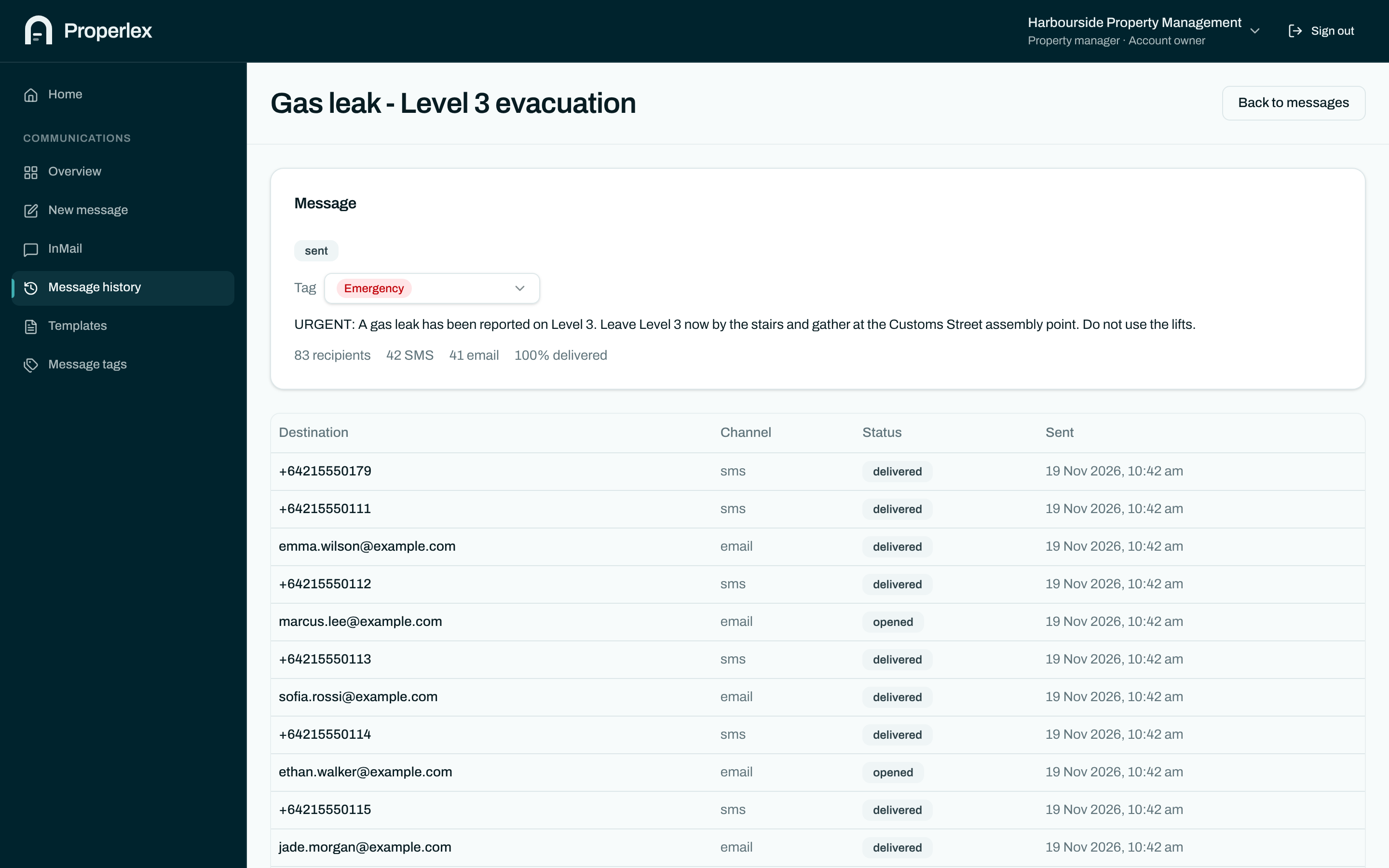
83 of 83 delivered
Gas leak - Level 3 evacuation
A gas leak, from first report to a record that stands up
Something goes wrong
00:00A gas leak is reported in an office building. Everyone at that property needs to know now, and nobody at your other properties needs to panic.
Press Emergency
00:20The composer opens set to SMS and email, your Emergency tag and the tenants' emergency contacts. You choose the building and check who is included.
One send, both channels
00:35It goes to the people at that property, including visitors signed in on site, by SMS and email at once.
See who has it
Minutes laterAs the carrier and mail servers report back, each recipient shows as delivered or bounced, so you know who to reach another way.
The record stands up
AfterwardsThe broadcast is marked Emergency in your history, with every recipient, channel and outcome, for the owner, the insurer and the incident review.
Set up before you need it, one press when you do
The Emergency button on your dashboard and Activity page opens the composer with the choices that matter already made. You check the property and the people, then send.
- 1
SMS and email together
Both channels are on from the start. Add InMail if you want it in the portal too.
- 2
Your Emergency tag
The broadcast files itself, and is marked Emergency in your message history.
- 3
The tenants' emergency contacts
Tenant contacts who hold your Emergency position are selected, so each business's nominated person hears first.
- 4
Visitors on site
With Visitor Management on, the visitors signed in at the property are added.
Why the contacts stay accurate
Kept current by the people closest to it
Each tenant, vendor and partner company keeps its own contacts current in its portal. The number you send to is the number they use, not an old spreadsheet entry.
Tied to the actual property
Contacts belong to properties, so an emergency notice reaches the people at that address and nobody else.
Who is on site, right now
Visitor and contractor sign-in gives you a list of who is at the property: the people an evacuation has to account for.
Where phone trees and email lists fail in an emergency
Most buildings rely on a contact spreadsheet, an email list and someone with a phone. Each step costs minutes, and none of them tells you who never got the message.
| The job | Spreadsheets, email lists and phone trees | With Properlex |
|---|---|---|
| Starting the notice | Find the latest contact list, then open email and a phone. | Press Emergency on the dashboard. The composer opens set up for an emergency. |
| Reaching the right people | Copy addresses for one building out of a portfolio-wide spreadsheet. | Choose the property; contacts belong to properties, so it reaches that building and nobody else. |
| Visitors on site | Not reached unless someone reads the sign-in book. | Visitors signed in on site are added, by SMS and email, when Visitor Management is on. |
| Several channels | An email, then a round of calls or texts from personal phones. | SMS and email in one send. |
| Knowing who has it | No idea who missed it. | Delivered or bounced for every recipient, so you know who to reach another way. |
| Afterwards | Reconstruct who was told from sent items and call logs. | The broadcast is marked Emergency in your message history, with its delivery report. |
What to have ready
Emergency notices work when the groundwork is done in a quiet week. Work through this list with your team, then test it in your next drill.
- Every tenant has nominated an emergency contact, who holds your Emergency position
- Building procedures and after-hours numbers are published for each property
- Visitors and contractors sign in, so you know who is on site
- Saved templates for the likely events: gas leak, fire alarm, water or power outage, lift outage, severe weather and an all clear
- The people who can send an emergency notice know where the Emergency button is
- A test notice to your own team, run as part of each drill
Related guides
- How-to8 min read
How to broadcast urgent notices to tenants and owners
How to broadcast urgent notices, from maintenance shutdowns to safety alerts: pick recipients by property, send by SMS and email, confirm delivery, keep a log.
Read article - Buyer's guide3 min read
Mass notification for property managers
Mass notification software for property managers compared: Everbridge, Rave, OnSolve, AlertMedia, bulk SMS tools and Properlex, and how to choose.
Read article - How-to6 min read
After-hours contact for tenants: what to publish
After-hours contact for tenants: what to publish, who should answer and how to keep the numbers current, with a checklist and a ready-to-copy notice.
Read article
Emergency notification questions
What is emergency notification software for property management?
Software that lets a property manager send an urgent notice to everyone at an affected property, on several channels at once, and record who received it. In Properlex that is one SMS and email broadcast, set up from the Emergency button.
Who receives an emergency broadcast?
Whoever you choose. The composer starts with your Emergency tag, the tenant contacts who hold your Emergency position and, with Visitor Management on, visitors signed in on site. You can add contact types such as vendors and partners, or other positions, before you send.
Can I send to just one building?
Yes. Choose the affected property, and only the people at that property receive it.
Which channels does it use?
SMS and email together. You can add InMail before sending, so it also appears in each recipient's portal.
How do I know who received it?
Each recipient's status, such as delivered or bounced, is recorded as the SMS carrier and mail server report back, and shows on the message's delivery report. Bounced contacts are the people to reach another way.
Who on my team can send one?
Team members with the sender role or above whose access type lets them create messages.
Does it replace our evacuation scheme or emergency plan?
No. Properlex is how you tell people. In New Zealand many buildings need an evacuation scheme approved by Fire and Emergency New Zealand, and in Australia AS 3745 sets out emergency planning for facilities. Keep those in place; Properlex handles the notices and the record.
Who is it for?
Property managers and facilities teams looking after commercial office, retail and shopping centre, mixed-use and industrial property in New Zealand and Australia.
Be ready before the next emergency
We'll help you set up your properties, contacts and emergency notices, so the first time you need it isn't a test.