Add a property
Go to Properties, then Portfolio, select Add property, and enter its name, address and country.
- For
- Property managers
Each building or site you manage is a property. You use properties to target messages, connect contacts, and set things that apply only there.
Before you start
You need the Add properties control in your access.
Steps
Go to Properties, then Portfolio.
Select Add property.
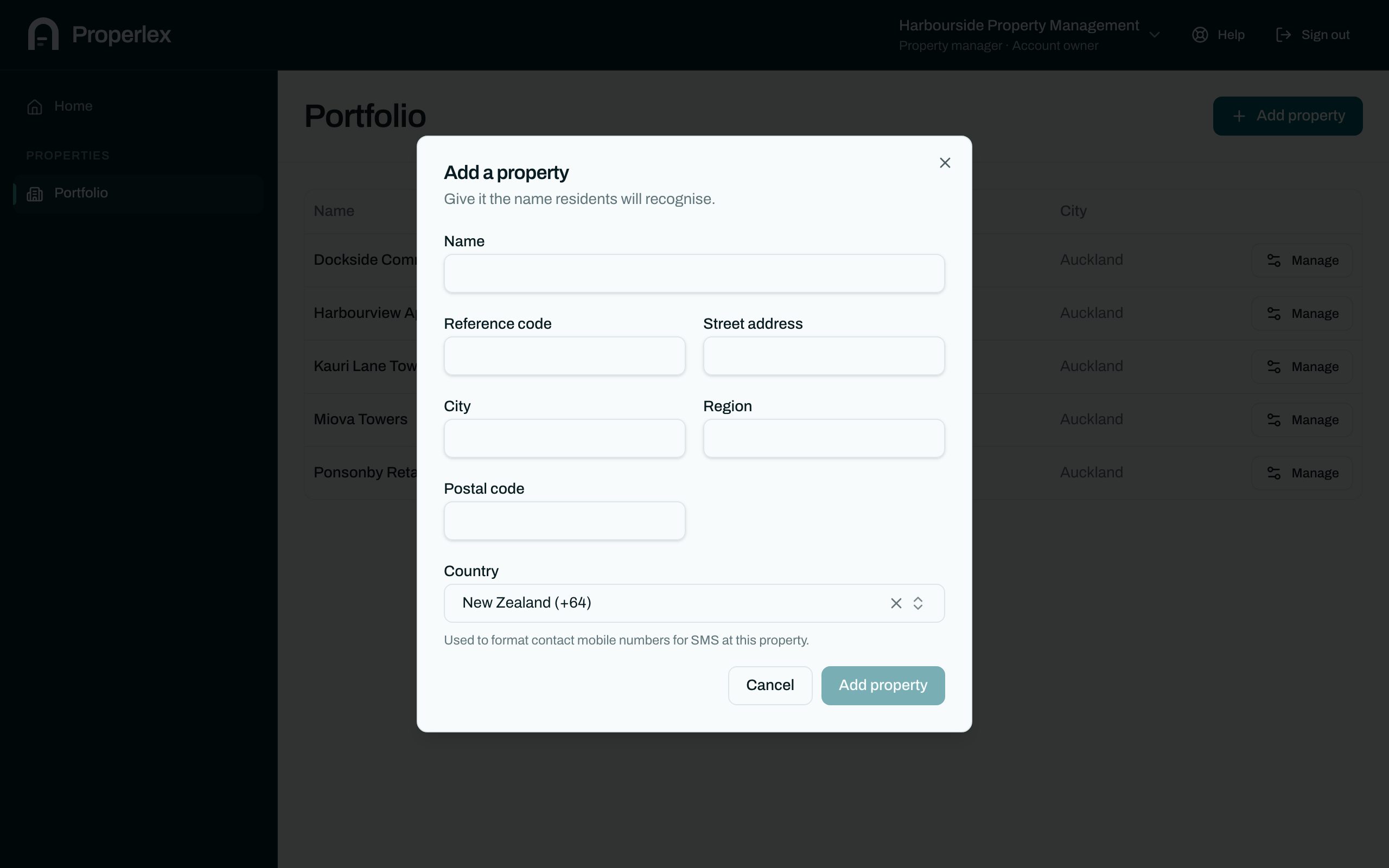
Give it a Name residents will recognise, for example "Harbourview Apartments".
Add a Reference code if you use one.
Enter the Street address, City, Region, Postal code and Country. The country is used to format mobile numbers for SMS at this property.
Save.
What happens next
The property appears in your portfolio. Next you can:
Add the people tenants, vendors and partners should contact. See Add property contacts.
Add tenants, vendors and partners and link them to the property. See Add a contact.
Common problems
I removed a property by mistake. Removed properties are listed under Removed properties on the Portfolio page for 12 months. Select Restore to bring it back. After 12 months they're deleted permanently.
I can't see Add property. Your access doesn't include adding properties. Ask an admin.
Last checked against the app on .