Contractor and visitor sign-in system.
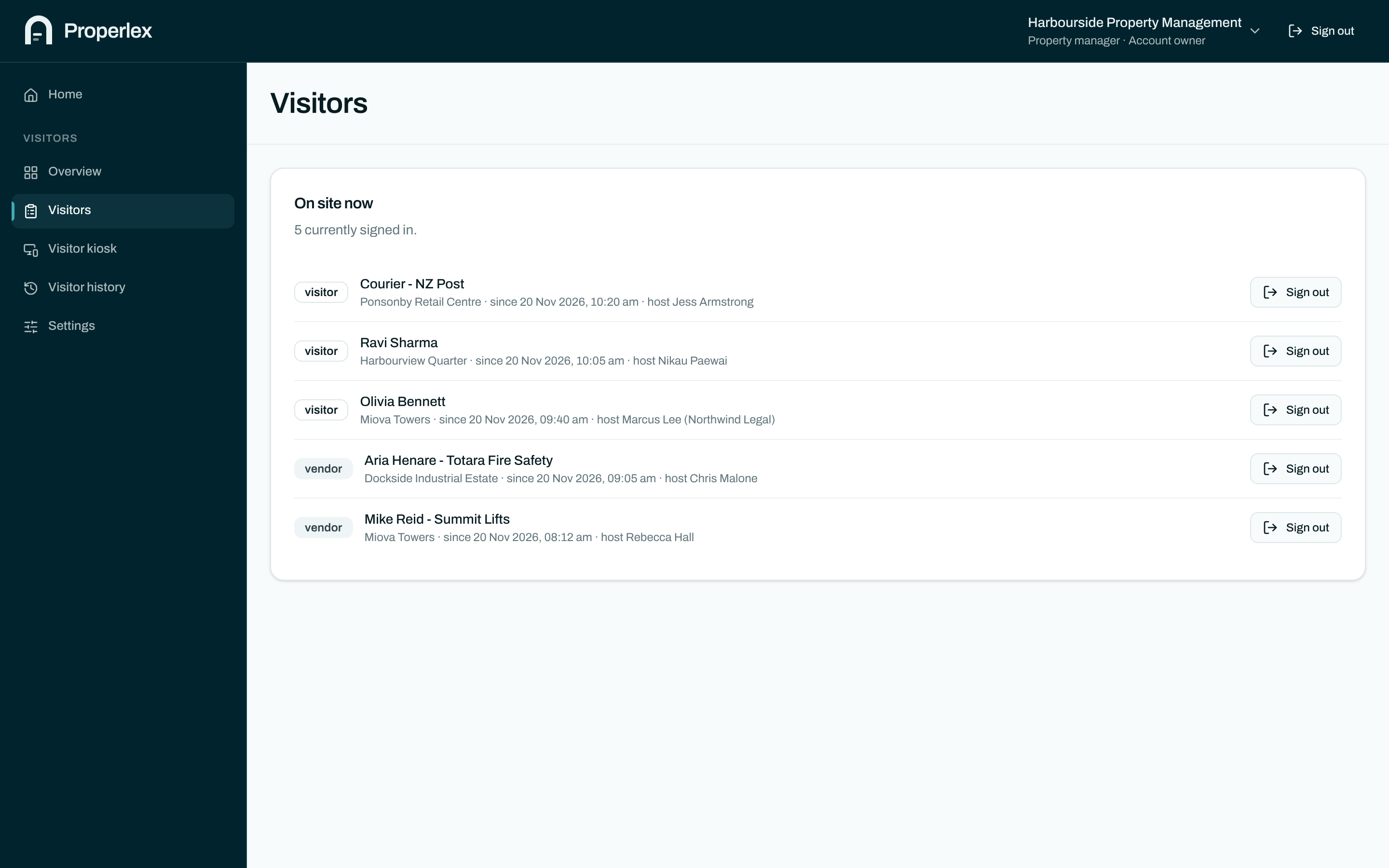
Properlex is a contractor and visitor sign-in system for commercial buildings. Contractors sign in from their phone or at the property's kiosk and complete any induction that is due first. Visitors sign in at the kiosk or by scanning a QR code. You see a live list of who is on site at each property, with a timestamped history of every visit.
What is a contractor sign-in system?
A contractor sign-in system records who is working at a building, when they arrived and left, and what safety steps they completed before starting. It replaces the paper book at reception, which is hard to read, easy to skip and no help in an evacuation.
In New Zealand, the Health and Safety at Work Act 2015 gives the businesses that manage a workplace and the contractors working in it overlapping duties, and Australia's WHS laws work the same way. Knowing who is on site, and that they have been inducted and told about the hazards, is part of how those duties are met in practice.
In Properlex, contractors sign in from their phone or at the property's kiosk, complete any contractor induction or hazard register that is due first, and appear on a live list of who is on site. Visitors sign in at the same kiosk or by scanning the property's QR code, with no account needed.
Signing in, for contractors and visitors
- 1
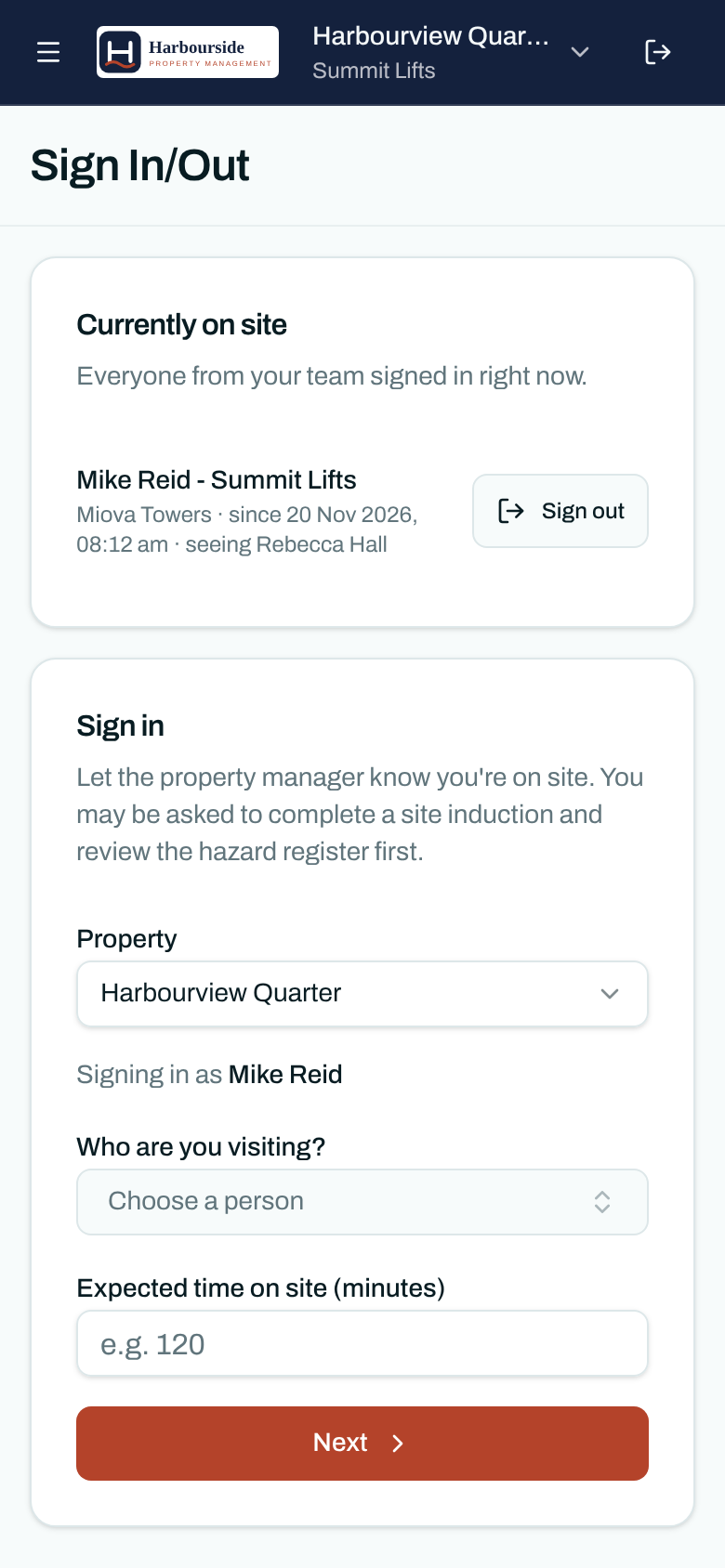
Vendors sign in from their phone
A contractor signs in at the property from the Properlex portal, with who they are seeing and how long they expect to be.
- 2
Visitors use the kiosk link
Each property has its own sign-in link for visitors. Put it on a tablet at reception or a QR code at the door.
- 3
See who is on site
A live list shows who is at each property now, and the history shows every visit with sign-in and sign-out times.
Why it replaces the paper book
- No more paper bookA record you can search, instead of a visitor book nobody reads.
- Accounted for in an emergencyThe on-site list is the list an evacuation has to account for.
- Contractors on recordKnow when vendors arrived and left, for safety and for the invoice.
An electrician arrives for a switchboard job
A contractor turns up at a shopping centre at 7am to work on a switchboard before trading starts.
- 1
They sign in at the door
7:00The electrician scans the QR code on the poster at the loading dock, or opens their Properlex portal, and signs in with their login.
- 2
Safety steps first
7:02Your site induction has been updated since their last visit, so they complete the new version and confirm the hazard register before they are signed in.
- 3
On the list
7:05They show on the live list of who is on site at the centre, with who they are there to see and when they expect to leave.
- 4
Signed out, or reminded
LaterThey sign out when they leave. If they stay longer than expected, they get a reminder, and your auto sign-out rules tidy up the rest.
- 5
A record you can find
Any timeEvery visit is kept with sign-in and sign-out times, and what they agreed to at induction stays on their record, ready to export.
Paper books and spreadsheets miss the moments that matter
A sign-in book at reception records names. It cannot check an induction, chase someone who forgot to sign out, or tell you who is in the building when the alarm goes.
| The job | Spreadsheets, email lists and phone trees | With Properlex |
|---|---|---|
| Knowing who is on site now | Read down a paper book, assuming everyone signed out. | A live list for each property, with overstay reminders and automatic sign-out. |
| Inductions | A separate form, often filled in after the work has started. | Completed before they are signed in, whenever an induction or hazard register is due. |
| Visitors | A pen on a string and handwriting nobody can read. | A kiosk link or QR code for each property, in its brand, with your privacy policy and terms agreed. |
| In an emergency | Someone grabs the book on the way out. | The on-site list is up to date, and visitors signed in on site are included in emergency broadcasts. |
| Looking back | Boxes of old books, or nothing at all. | Past visits by property, type and date, with what each contractor agreed to. |
Contractor & Visitor Sign-In questions
How do visitors sign in?
Each property has a kiosk link. Visitors open it on a tablet at reception, or from a QR code, and enter their name and who they are visiting.
Do vendors need to download an app?
No. Vendors sign in from the Properlex portal in their phone's browser.
Can I see who was on site last week?
Yes. Every visit is kept with its sign-in and sign-out times.
Can contractors be made to complete an induction before they sign in?
Yes. With Health & Safety on, any site induction or hazard register that is due is completed before the contractor is signed in, and what they agreed to is kept on their record.
What happens if someone forgets to sign out?
People who stay longer than expected get a reminder, and you can set auto sign-out rules in Visitors settings.
Is the contractor's login saved on a shared kiosk tablet?
No. On a shared tablet the contractor's login is never saved.
Does it help with health and safety duties?
It gives you a record of who was on site, when, and which induction and hazards they confirmed. That supports the duties under the Health and Safety at Work Act 2015 in New Zealand and the WHS laws in Australia, but it does not replace your own safety system.
Related guides
- How-to5 min read
Contractor sign-in for commercial buildings
Contractor sign-in for commercial buildings: what to record, how to replace the paper book and how to know who is on site when something goes wrong.
Read article - How-to7 min read
Contractor induction for commercial buildings
Contractor induction for commercial buildings: what to cover, how to deliver it before contractors arrive and how to keep a record you can find later.
Read article - Checklist6 min read
Contractor contact list for facilities managers
A contractor contact list is only useful if it is right when you need it. Here is how facilities managers keep every site's contacts current.
Read article
Works alongside
- Contractor Compliance
Site inductions, hazard registers, and contractor insurance and licences, checked at sign-in.
- Incident Reporting
A quick report from anyone at the property, with jurisdiction rules and an audit trail.
- Document Storage
Evacuation plans, site maps and house rules, shared only with the right parties.
Retire the sign-in book
We'll set up a kiosk link and a QR poster for one of your properties.