Add a hazard
In Hazard register, select Add hazard. Describe it, rate the likelihood and consequence before and after controls, list the control measures and set a review date.
- For
- Property managers
- Needs
- Contractor compliance switched on
Each hazard is rated on a 5 x 5 likelihood x consequence matrix, before controls (inherent risk) and after them (residual risk).
Steps
Go to Health & Safety, then Hazard register, and select Add hazard.
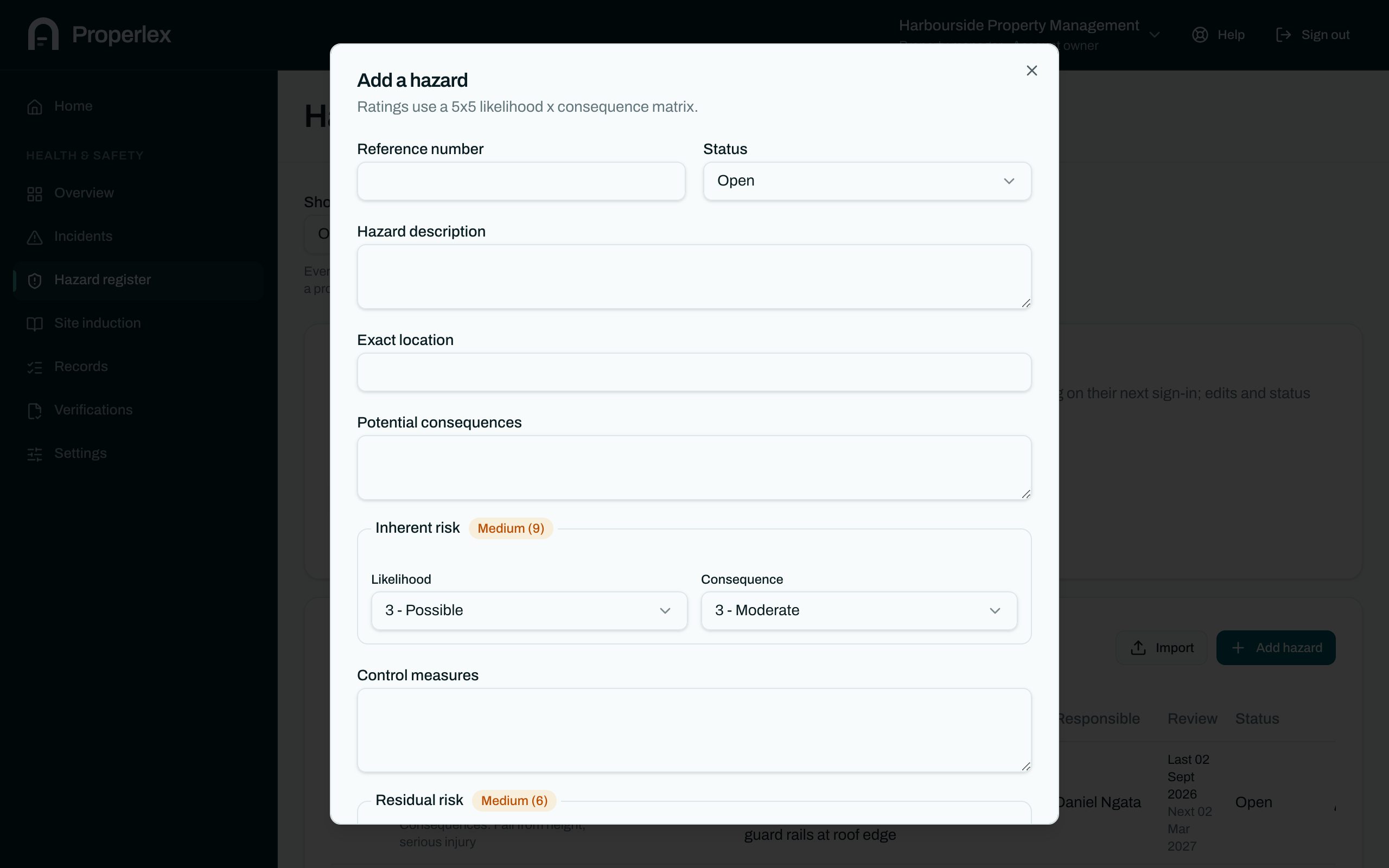
Enter a Reference number, the Hazard description and the Exact location.
Describe the Potential consequences.
Rate the Likelihood (Rare to Almost certain) and Consequence (Insignificant to Severe) before controls.
List the Control measures, then rate the risk again with them in place.
Choose the Responsible person, the Last reviewed date and the Next review due date.
Choose the status: Open, Controlled or Closed.
Select Save hazard.
How ratings work
Likelihood x consequence gives a score from 1 to 25: Low (1 to 4), Medium (5 to 9), High (10 to 16) or Extreme (17 to 25).
Common problems
I want to stop showing a hazard. Set its status to Closed. It stays on the register, and Show closed lists it. Deleting it removes it, but contractors who confirmed it keep their record.
Last checked against the app on .